Employee Timesheet & Shift Schedule, inside the spreadsheet you already use.
Build a month's employee schedule on one grid in Google Sheets — the staff rota for a café, a shop, a clinic, a small factory. Catch the double bookings, rest-time breaches and overtime a spreadsheet would let straight through. Print a signed timesheet for every person.
Make your own copy — freeWant to build the checks yourself instead? Seven mistakes in a Google Sheets shift schedule gives you working formulas for four of them and is straight about the three where a formula runs out of road. Two more go deeper: why night shift hours come out negative, and weekly overtime on a monthly rota. If you would rather start from a template, there is a monthly staff rota template, a staff roster template with timesheets, and a walk-through of how to make a monthly employee schedule from scratch.
Free for a team of any size. No sign-up with us, no email, no card — you make a copy into your own Google Drive and it is yours. Nothing leaves your spreadsheet, on the free version or the paid one.
What it does
Four steps, in the order you actually do the job.
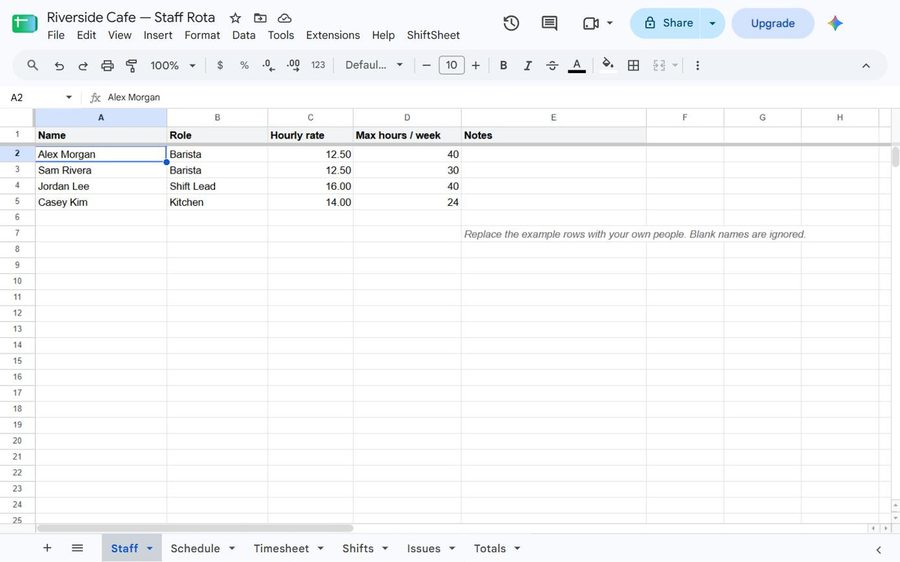
1 · Your people, your shifts
Two plain sheets you fill in yourself: who works for you, and what your shifts
are. Define Morning 07:00–15:00 once and type M from then on.
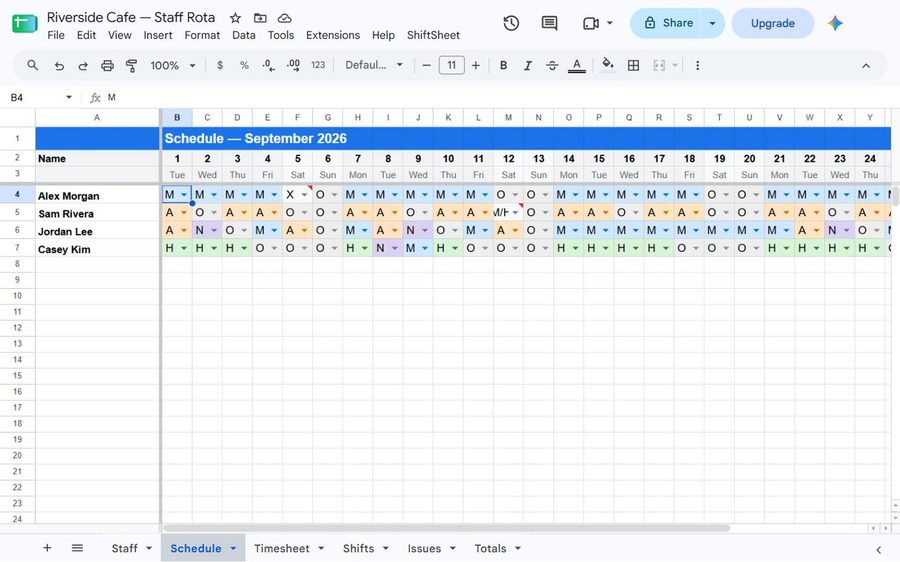
2 · Build the month
One click makes the grid — every day of the month, weekends shaded, a colour for each shift, and a dropdown of your shift codes; anything else typed in is flagged as an unknown code.
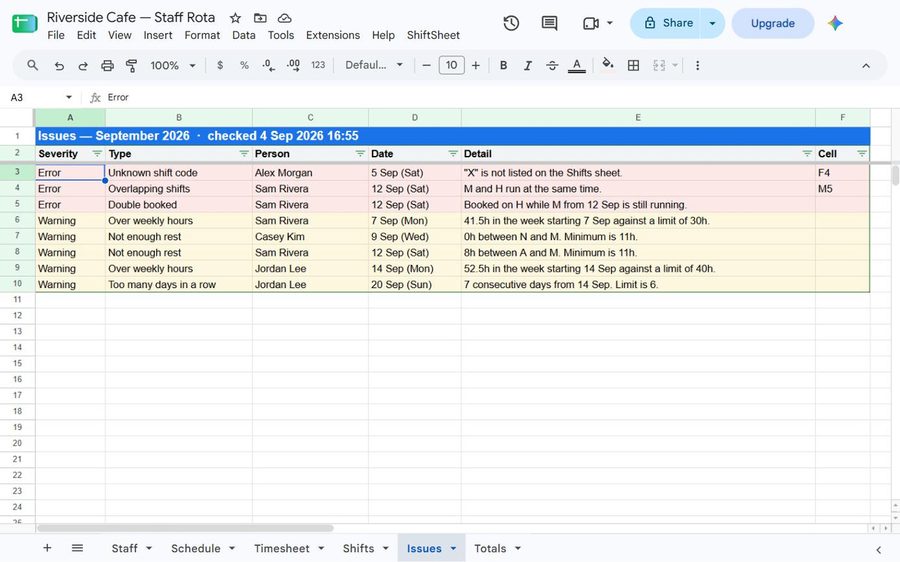
3 · Check it before you publish it
Seven mistakes a spreadsheet cannot see, among them the same person twice, four hours of sleep between shifts, a quiet slide into overtime, eleven days without a break.
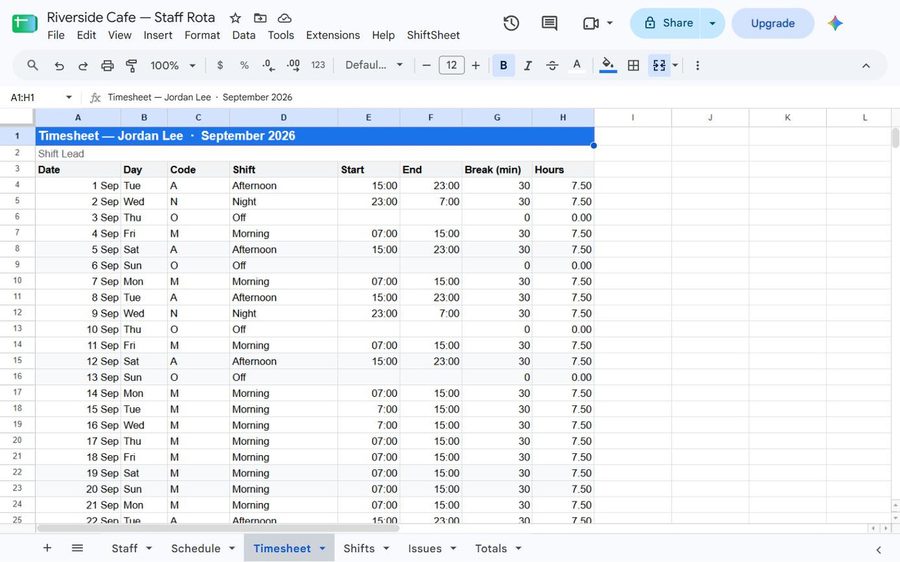
4 · Hours and timesheets
Hours per person, overtime calculated weekly rather than monthly, and a printable timesheet with a signature line at the bottom — the sheet each person signs and payroll is worked out from. On the paid version the pay rates on your Staff sheet turn those hours into what the month cost you.
The checks
These run against the whole month in one pass. Findings go to their own sheet — your grid is never edited.
- Overlapping shifts — two codes in the same cell whose hours run into each other, like
M/H. - Double booked — a shift that starts before the previous one has finished, including one that runs past midnight into the next day's.
- Not enough rest — less than your minimum gap between clocking off and clocking back on. Overnight shifts are measured correctly, not by calendar day.
- Over weekly hours — against that person's own limit if they have one, otherwise your default.
- Too many days in a row — runs of consecutive working days with no day off.
- Unknown shift code — anything typed into the grid that is not on your Shifts sheet.
- Not on Staff sheet — somebody scheduled in the grid who has no row on your Staff sheet, so no pay rate or hour limit is applied to them.
It will not eat your schedule
Every rule below exists because a scheduling add-on somewhere broke it.
Old months are kept, not overwritten
Building September does not erase August. The previous grid is renamed to
Schedule 2026-08 and left in the spreadsheet.
Your cells stay your cells
After setup, nothing writes to Staff or Shifts. The Schedule grid is rebuilt only when you ask for a new month, and a grid that already has shifts in it is renamed and kept, never erased. Reports go to their own sheets.
Shift colours are yours
Colours are read from your Shifts sheet. As many as you have shifts. No fixed palette to run out of.
Overtime is weekly, not monthly
Fifty hours one week and thirty the next is ten hours of overtime, not zero. Averaging across the month quietly underpays people. A week split across two months is counted from the days on this month's sheet, and Totals says so.
Pricing
Free, with no limit on how many people you schedule, and your first 30 days of labour cost included. The full version is $39 once — not a subscription, and fourteen days no questions asked. Get the full version
The free version is a working product. The schedule, every check, hours and overtime hours do not expire, and there is no limit on how many people you schedule. You also get to try the money side: for 30 days from your first Totals, the Rate and Cost columns show real figures, and your first “Timesheet for everyone” is free. Paid is $39 once, and it keeps that money side on: what each shift costs you, and every timesheet printed in one go. Free scheduling apps exist as well, and some of them do more than this one does. All of them start the same way: you open an account, you add your staff to their system, and the names, hours and pay sit on their server. ShiftSheet has no account and no server. The month stays in a spreadsheet in your own Drive, and the paid version is one payment with nothing to cancel.
- Any number of people
- Month grid and shift library
- All seven checks
- Hours and overtime hours per person
- Timesheet for one person at a time
- Rate and Cost for your first 30 days
- Your first “Timesheet for everyone”
- Everything in the free version
- Pay rates and labour cost, with overtime at the multiplier you set, on the Totals sheet — kept on after the first 30 days
- Every timesheet printed in one go, every time
Fourteen days, no questions asked. Email support@shiftsheet.me within fourteen days of buying and you get your money back. You do not have to explain why.
After payment you get a licence code by email, normally within one working day. Open your spreadsheet, choose ShiftSheet ▸ Enter licence code (Extensions ▸ ShiftSheet if you installed from the Marketplace) and paste it. No second file, nothing to move across. The code is tied to your Google account; anyone else who runs ShiftSheet in the same file enters the same code once. The code is checked inside the spreadsheet; nothing is sent anywhere.
| Free | Paid | |
|---|---|---|
| People | no limit | no limit |
| Schedule, checks, hours and overtime hours | yes | yes |
| Timesheet for one person | yes | yes |
| Pay rates and labour cost, with overtime at the multiplier you set | first 30 days | yes |
| Every timesheet at once | the first one | yes |
Privacy, in one paragraph
There is no server. ShiftSheet runs inside Google Sheets, on Google's own infrastructure. Your staff names, hours and pay rates never travel to us, because there is nowhere for them to travel to.
The add-on can read and write only the one spreadsheet you open it in — that is
what the spreadsheets.currentonly permission means. It cannot see your
other files, your Drive, your email or your calendar.
That is the only permission its code asks for, and it makes no network calls at all. No third party. The licence code is checked inside the spreadsheet and never sent anywhere. No analytics, no tracking.
Google classes that permission as non-sensitive, so the "Google hasn't verified this app" screen should not appear when you open your copy. If you do see it, the install steps below say what to click. The permission is described in full in the privacy policy.
Questions
Does it change my spreadsheet?
It creates sheets — Staff, Shifts, Schedule, and the report sheets. After that it writes to the report sheets, and to the Schedule grid only when you ask it to build a month. A grid that already has shifts in it is renamed and kept, never erased.
Can two people work two shifts in one day?
Yes. Put both codes in the cell separated by a slash: M/A. Both appear
as separate lines on the timesheet, and the checker will tell you if they overlap.
Does it handle night shifts that run past midnight?
Yes. A shift from 23:00 to 07:00 is measured as eight hours ending the next morning, so the rest-gap check knows that a 07:00 start the following day means zero rest.
Does it sync to Google Calendar?
No. ShiftSheet does not connect to Google Calendar; it works inside the one spreadsheet you open it in.
What happens to my data if I stop using it?
Nothing is taken away. Uninstall the add-on and every sheet it made stays in your spreadsheet, readable as an ordinary spreadsheet, forever.
Is the free version a trial?
No. The schedule, every check, hours and overtime hours do not expire and are not limited by head count. The only thing on a clock is the money side: Rate and Cost show real figures for 30 days from your first Totals, and the first “Timesheet for everyone” is free. After that those two are what the $39 pays for.
Why not use one of the free scheduling apps?
Use one if it fits — some of them do more than this does. The trade is the same in all of them: an account to open, your staff added to their system, and their names, hours and pay held on a server you do not own. ShiftSheet is the other side of that trade. Nothing to sign up for, no server of ours, and when you stop using it the months you built are still an ordinary spreadsheet in your own Drive.
Does it do payroll?
No. It works out hours per person, overtime by week, and pay rates and what the month cost in wages (free for your first 30 days, then on the paid version). Then it prints a signed timesheet for each person. Handing that to whoever runs your payroll is where ShiftSheet stops — it does not file anything and it does not pay anybody.
Support
One person builds and answers for this add-on, so you are not writing to a queue. Email support@shiftsheet.me and you will get a reply within two working days.
To get it fixed on the first reply rather than the third, say:
- what you clicked, and what happened instead of what you expected
- the month you were building, and roughly how many people are on the Staff sheet
- the exact wording ShiftSheet showed you, whether it was the message strip at the top of the sheet or a dialog box
Do not send the spreadsheet itself. It holds your staff names and their pay, and nothing in it helps more than the message text does.
Refunds are handled by Polar Software Inc., who sold you the full version: 14 days, no questions asked. Ask us or ask them, either works.
Install
Click the button below. Google will ask if you want to make a copy of the ShiftSheet scheduling template — say yes. The copy lands in your own Drive, the ShiftSheet menu appears in the menu bar next to Help, and you own every cell in it.
Make a copyShiftSheet is also listed on the Google Workspace Marketplace, if you would rather install it the way your organisation installs everything else. Either route runs the same code and nothing leaves your spreadsheet.
The first time you run something from the ShiftSheet menu, Google asks you to allow it. ShiftSheet's script asks for one permission: to view and manage the spreadsheet it is installed in. If you install from the Marketplace instead, Google shows two more — your account email address and your basic profile info. Those come from our listing configuration; the add-on's code never reads them and they are not in its manifest. Google classes all three as non-sensitive, so the "Google hasn't verified this app" screen should not appear. If you do see it, click Advanced, then Go to ShiftSheet (unsafe), then Allow. You can see exactly what the code does at any time — it is in your own copy, under Extensions ▸ Apps Script.